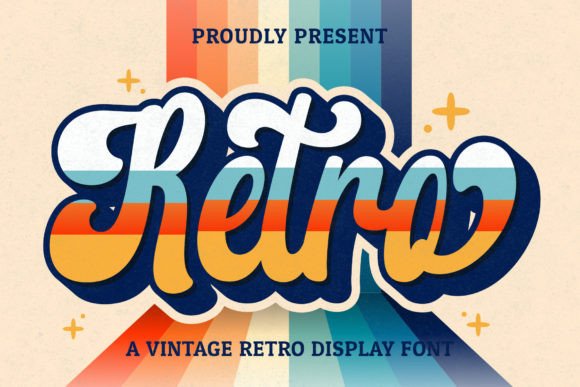
Retro Script: A Vintage Touch for Modern Design
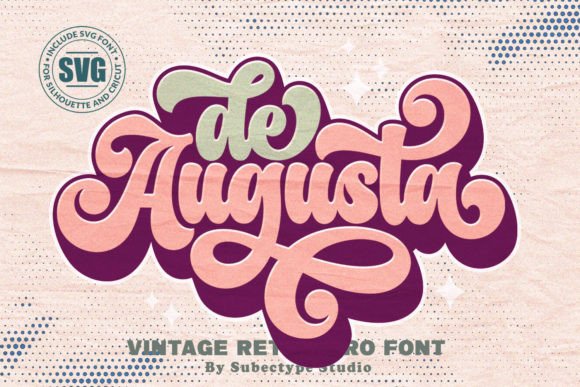
When it comes to design, the right font can make all the difference. Retro Script is a vintage-style handwritten font that brings a unique, nostalgic flair to any project. Whether you're working on logos, branding, invitations, or social media posts, this font adds that special retro touch that stands out in today’s digital world.
Retro Script is ideal for designers looking to infuse their work with a sense of history and character. Its flowing lines and elegant swashes evoke the style of old-timey lettering, making it perfect for projects that aim to capture a bygone era. From wedding stationery to retro-themed marketing materials, this font offers versatility and charm that few others can match.
Why Choose Retro Script?
Retro Script isn’t just another font—it’s a tool that can elevate your creative projects. Its PUA encoding ensures that all glyphs and swashes are easily accessible, giving you full control over how your text looks. This makes it particularly useful for designers who want to customize their typography without the hassle of complicated features.
One of the key advantages of Retro Script is its ability to blend seamlessly with both modern and traditional design elements. It works well with clean layouts, bold colors, and minimalist aesthetics, adding a touch of warmth and personality. This flexibility makes it a go-to choice for a wide range of applications.
Another benefit of using Retro Script is its readability. While it has a handwritten feel, it doesn’t sacrifice clarity. The letters are well-proportioned and easy to read, even at smaller sizes. This makes it suitable for everything from headlines to body text, depending on your design needs.
Applications for Retro Script
The versatility of Retro Script means it can be used in a variety of design contexts. For instance, in logo design, it adds a personal and authentic feel that can differentiate a brand from its competitors. Many businesses use Retro Script to create logos that reflect a sense of nostalgia or craftsmanship, appealing to customers who value quality and tradition.
In the realm of branding, Retro Script helps establish a distinct identity. It’s especially popular among boutique brands, artisanal products, and small businesses that want to stand out. By using this font, you can create a visual language that resonates with your target audience and reinforces your brand’s story.
Wedding designs also benefit greatly from Retro Script. Whether it’s for invitations, place cards, or signage, this font adds a romantic and timeless quality. Couples often choose Retro Script to give their wedding materials a vintage feel that complements their overall theme.
Social media posts are another area where Retro Script shines. With the rise of visual storytelling, many creators use this font to add a personal touch to their content. It’s perfect for captions, quotes, and promotional graphics that need to grab attention while maintaining an artistic edge.
Integrating Retro Script into Your Workflow
Using Retro Script in your design workflow is straightforward. Since it’s PUA encoded, you don’t have to worry about limited glyph access. This means you can freely experiment with different characters, ligatures, and stylistic alternatives to achieve the look you want.
For designers working in Adobe programs like Photoshop, Illustrator, or InDesign, Retro Script is easy to install and use. Simply download the font file, install it on your system, and start incorporating it into your projects. You’ll find that it integrates smoothly with other design elements, allowing you to maintain consistency across your work.
When working with clients, it’s helpful to explain the benefits of Retro Script. Highlighting its unique aesthetic and practical features can help them understand why it’s a good choice for their project. This not only builds trust but also demonstrates your expertise as a designer.
Best Practices for Using Retro Script
To get the most out of Retro Script, consider the following tips. First, use it strategically. While it’s visually appealing, overusing it can make your design feel cluttered. Instead, reserve it for key elements like headings, titles, or focal points to maintain balance.
Second, pair it with complementary fonts. Retro Script works well with sans-serif or serif fonts that provide contrast. This combination can enhance readability and create a more dynamic visual hierarchy. For example, pairing it with a clean sans-serif like Helvetica or Arial can give your design a modern yet nostalgic feel.
Third, pay attention to spacing and alignment. Handwritten fonts can sometimes appear uneven if not properly adjusted. Use kerning and tracking tools to ensure that your text looks polished and professional. This is especially important when working with larger blocks of text.
Finally, test your design in different formats. Whether it’s for print or digital use, make sure that Retro Script looks good in all contexts. This includes checking how it appears on screens, in printed materials, and across various devices.
Where to Find Retro Script
If you’re interested in using Retro Script, you can find it on various font marketplaces. Websites like Creative Market, MyFonts, and Font Squirrel offer downloadable versions of the font. Be sure to check the licensing terms to ensure that it’s suitable for your intended use, whether it’s personal, commercial, or educational.
Some designers also recommend exploring free alternatives if you’re on a budget. While they may not have the same level of detail as premium fonts, they can still provide a similar aesthetic. However, for professional projects, investing in a high-quality font like Retro Script is often worth the cost.
Once you’ve acquired Retro Script, take some time to experiment with it. Try different sizes, colors, and backgrounds to see how it performs in various scenarios. This will help you develop a better understanding of its strengths and limitations, allowing you to use it more effectively in your future projects.