Death Star: A Bold Font for a Galaxy of Creativity
If you're a fan of the Star Wars universe, you know that the Death Star is more than just a weapon—it's an icon. But what if you could bring that same iconic presence to your design projects? Enter Death Star, a display font that captures the essence of the galaxy far, far away with its unique aesthetic and retro flair.
What Is Death Star?
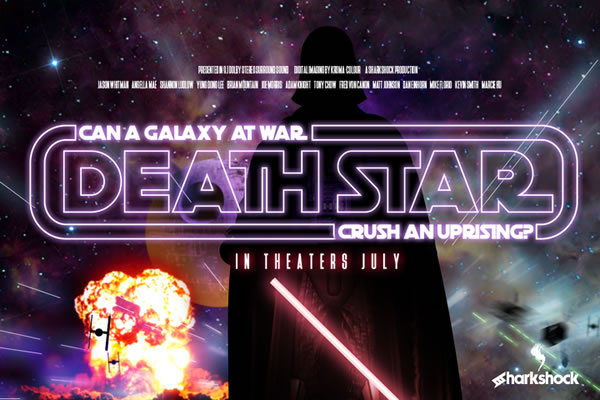
Death Star is a grotesque display font designed for those who want to add a touch of sci-fi style to their work. It features all caps, giving it a strong, bold appearance that's reminiscent of 80s typography. The font's geometrically rounded curves and minimal stroke width variation create a retro look that feels both nostalgic and modern.
Originally created for fans of the Star Wars series, Death Star has since found its way into various creative fields, from blog headers to t-shirt designs. Its clean, sharp lines make it ideal for any project that needs a little extra flair without sacrificing readability.
Key Features of Death Star
Death Star comes with several features that make it stand out from other fonts. One of its most notable characteristics is the inclusion of alternates and ligatures, which allow for greater customization and visual interest. These can be accessed through the glyphs panel in programs that support OTF features, such as Adobe Illustrator or InDesign.
However, it's important to note that in the outlines version, alternates must be selected manually from the Glyphs panel. This means that users should be prepared to spend a bit more time fine-tuning their designs if they want to take full advantage of the font's capabilities.
The font also has extremely tight kerning, which means that the spacing between letters is very close. This makes Death Star best suited for larger sizes, where the details can really shine. When used at smaller sizes, the tight spacing can make the text appear cramped or difficult to read.
Where Can You Use Death Star?
Death Star is incredibly versatile and can be used in a variety of contexts. For bloggers, it's perfect for headlines or section titles that need to grab attention. For designers, it's great for logos, posters, or any project that needs a bold, eye-catching look.
Business owners looking to create a unique brand identity may find Death Star useful for creating a distinctive logo or marketing material. Its retro style can give a project a vintage feel, while still maintaining a modern edge.
For t-shirt designers, Death Star offers a way to incorporate Star Wars themes into clothing designs without relying on stock images or illustrations. It's also a good choice for any project that needs a strong, recognizable font that stands out from the crowd.
Pairing Death Star with Other Fonts
One of the best ways to use Death Star is to pair it with another font that complements its style. A popular choice is Deutschlander, which adds an authentic movie poster feel when used together. This combination works especially well for projects that aim to evoke the look and feel of classic science fiction films.
When pairing fonts, it's important to consider how they interact with each other. Death Star has a strong, geometric style, so it pairs well with other fonts that have similar characteristics. Avoid using it with overly decorative or script-style fonts, as this can create a cluttered or confusing visual effect.
Limitations and Considerations
While Death Star is a powerful tool for designers and creators, it's not without its limitations. The font is limited to basic Latin and punctuation only, which means it may not be suitable for projects that require non-Latin characters. This is an important consideration for international users or those working on multilingual projects.
Another limitation is the manual selection of alternates in the outlines version. While this gives users more control over the final look, it can be time-consuming for those who are not familiar with glyph panels or advanced font features. If you're looking for a more streamlined experience, consider using the OTF version of the font instead.
Finally, because of its tight kerning, Death Star may not be the best choice for body text or long paragraphs. It's best used in short, impactful phrases where the visual impact is more important than readability.
Real-World Applications
Let's look at a few real-world scenarios where Death Star can be put to good use:
- Blog Headers: Use Death Star for your blog's main title or section headings to create a visually striking layout that draws readers in.
- Logo Design: Incorporate Death Star into a logo for a tech startup, a gaming company, or a sci-fi-themed business to give it a unique and memorable look.
- T-Shirt Designs: Add Death Star to t-shirts for a retro, futuristic vibe that appeals to fans of the Star Wars universe.
- Movie Posters: Pair Death Star with Deutschlander to create an authentic movie poster feel for a fan-made film or event promotion.
How to Evaluate Suitability
Before using Death Star in your project, consider the following factors:
- Project Type: Is your project a logo, a blog header, or a t-shirt design? Death Star is best suited for short, impactful text rather than long passages.
- Target Audience: Will your audience appreciate the retro sci-fi style of Death Star? Consider whether the font aligns with the tone and message of your project.
- Technical Requirements: Do you have access to software that supports OTF features? If not, you may need to adjust your workflow to accommodate the manual selection of alternates.
- Language Support: Does your project require non-Latin characters? If so, Death Star may not be the right choice.
By taking these factors into account, you can ensure that Death Star enhances your project rather than detracts from it.
Conclusion
Death Star is more than just a font—it's a statement. With its bold, retro style and unique character set, it offers a way to bring a piece of the Star Wars universe into your creative work. Whether you're a designer, a blogger, or a business owner, Death Star can help you make a lasting impression.
So, if you're looking for a font that combines nostalgia with modern design, give Death Star a try. Just remember to be patient, check the glyphs panel, and pair it wisely. With the right approach, Death Star can elevate your project to new heights—literally.